Windows 1.0

1985 · Windows

Microsoft's first Windows, from November 1985. It ran on top of MS-DOS and let you point and click instead of typing commands.1, 2

Bring your own copy Sources See every Windows version →

Released
20 November 19851
Runs on
Top of MS-DOS2, 3
Needed
256 KB of memory, two floppy drives and a graphics card1
Next version
Windows 2.0, December 19871

Why it was made

MS-DOS worked well, but many people found its typed commands hard to understand.1 Windows was Microsoft's answer to the Macintosh and its graphical screen.2 Instead of typing, you moved a mouse to point and click.1 Bill Gates called it "unique software designed for the serious PC user".1, 3
Close-up of the top of a Windows 1.0 screen: a blue title bar reading 'MS-DOS Executive', a yellow menu bar with File, View and Special, drive icons A and C with C selected, the path C:\WINDOWS, and file names in columns, with NOTEPAD.EXE highlighted under the mouse pointer.
Illustration · not a screenshot Close-up of our drawing: the MS-DOS Executive, where you picked files and programs with the mouse instead of typing their names. See the real screen

What it looked like

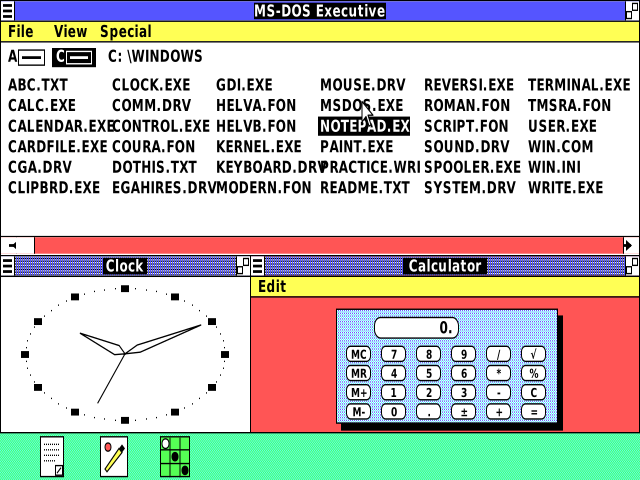
Windows 1.0 had drop-down menus, scroll bars, icons and dialog boxes, and you could switch between programs without closing them.1 Its windows could not overlap: they sat side by side, like tiles.2 It came with Paint, Notepad, Calculator, a calendar, a card file, a clock and a game called Reversi.1
A Windows 1.0 screen split into tiled windows: the MS-DOS Executive with a file list across the top; below it a Clock window with a dotted oval face and a Calculator window with a red background and a keypad; along the bottom, a green strip holding three small program icons.
Illustration · not a screenshot Our drawing of Windows 1.0 on a color (EGA) screen: the MS-DOS Executive on top, Clock and Calculator tiled below, and Notepad, Paint and Reversi shrunk to icons along the bottom. See the real screen

Key moments