Mac System 1

1984 · Mac

The system software of the first Macintosh, from January 1984. You worked on a desktop of icons and windows with a mouse.1, 2

Info only Sources See every Mac version →

Introduced
24 January 1984, with the Macintosh1
Price
$2,495 for the Macintosh1
Memory
128 kilobytes (KB)1
Programs
MacWrite and MacPaint1

A desk on the screen

The Macintosh screen looked like a light gray desktop. Icons showed what was there: the disk you put in, and the Trash for things you no longer needed. You slid documents around, put them in folders or threw them away by moving the mouse and pressing its button.2 Apple said a Mac typically took only a few hours to learn.1
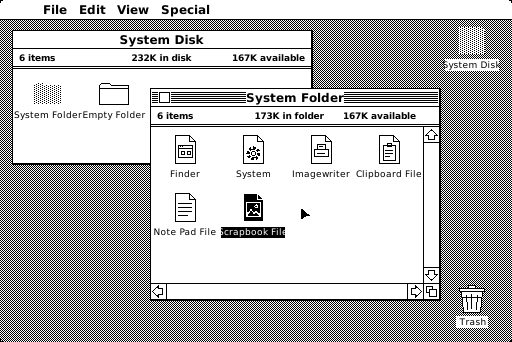
A black-and-white Macintosh desktop with a checkered gray background. A menu bar at the top shows File, Edit, View and Special. In front is a window titled System Folder with icons for Finder, System, Imagewriter, Clipboard File, Note Pad File and Scrapbook File, with Scrapbook File selected. Behind it is a plain System Disk window with a dotted System Folder and an Empty Folder. The disk icon sits at the top right and the Trash at the bottom right.
Illustration · not a screenshot Our drawing of the System 1 desktop from 1984. The System Folder window is in front and active, and the System Disk window behind it is inactive. See the real screen

The Finder

The desktop belonged to a built-in program called the Finder, which organized and managed your documents.2 Bruce Horn designed and wrote it, with help from Steve Capps. It was only 46K on disk.3
Close-up of the System Folder window: a striped title bar with a close box, a line reading 6 items, 173K in folder, 167K available, and icons for Finder, System, Imagewriter, Clipboard File, Note Pad File and a selected Scrapbook File, with scroll bars on the right and bottom.
Illustration · not a screenshot Close-up of our drawing: the System Folder window, with the Finder and the System among its icons. See the real screen

One program at a time

The first Mac had no multitasking: there was no room for the extra code it needed.3 To move to another program, you chose Quit, and the desktop appeared again just as you left it. Small desk accessories, like the Calculator and the Note Pad, were always available, whatever program you were using.2 In 1987, MultiFinder let a Mac keep several programs open at the same time.4, 5
Close-up of the top left of the desktop: the menu bar with File, Edit, View and Special, above the inactive System Disk window, whose header reads 6 items, 232K in disk, 167K available, with a dotted System Folder and an Empty Folder. The edge of the active System Folder window overlaps it on the right.
Illustration · not a screenshot Close-up of our drawing: the menu bar and the inactive System Disk window, partly covered by the active System Folder window. See the real screen

Key moments