Windows NT 3.1
1993 · Windows
Released on 27 July 1993 after five years of work: a 32-bit Windows built from scratch, with the look of Windows 3.1.1, 2, 3
Bring your own copy Sources See every Windows version →
- Led by
- Dave Cutler, who joined Microsoft in 19882
- Team
- About 20 engineers at first, about 150 by release2
- Type
- 32-bit, unlike Windows 3.11
A new Windows from scratch
In the late 1980s, Microsoft started a project to build an advanced new operating system from scratch.1 Dave Cutler, who had led the work on the VMS system at Digital Equipment Corporation, joined Microsoft on 31 October 1988 to build it. The team wanted a system that could run on chips other than Intel's, and use the larger memory of new 32-bit processors. At first it was meant to run OS/2 programs, but the team switched to Windows when Windows proved so popular.2
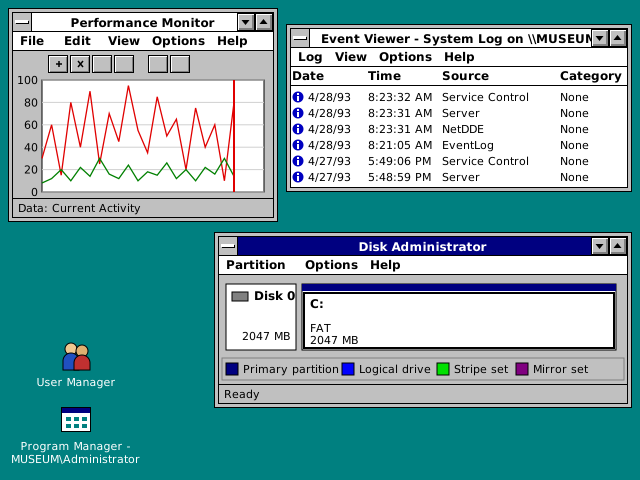
Same look, new inside
Most of the programs in Windows NT came from their Windows 3.1 versions, changed only where NT could do more. Program Manager now showed the name of the person who had logged on.3 Underneath, unlike Windows 3.1, it was a 32-bit system, made for demanding business, engineering and science programs.1 The team began writing the code in April 1989 and grew from about 20 engineers to about 150 by the time it shipped.2
))
Key moments
- 1988 Dave Cutler starts at Microsoft on 31 October.2
- 1989 In April, the team starts writing the code.2
- 1993 Windows NT 3.1 ships on 27 July.1, 2
- 1996 Windows NT 4.0 brings the look of Windows 95, with the Start button and taskbar, to Windows NT.4
- 2001 Windows XP comes out on 25 October. Windows XP Professional brings the foundation of Windows 2000, built on Windows NT, to the PC desktop.1