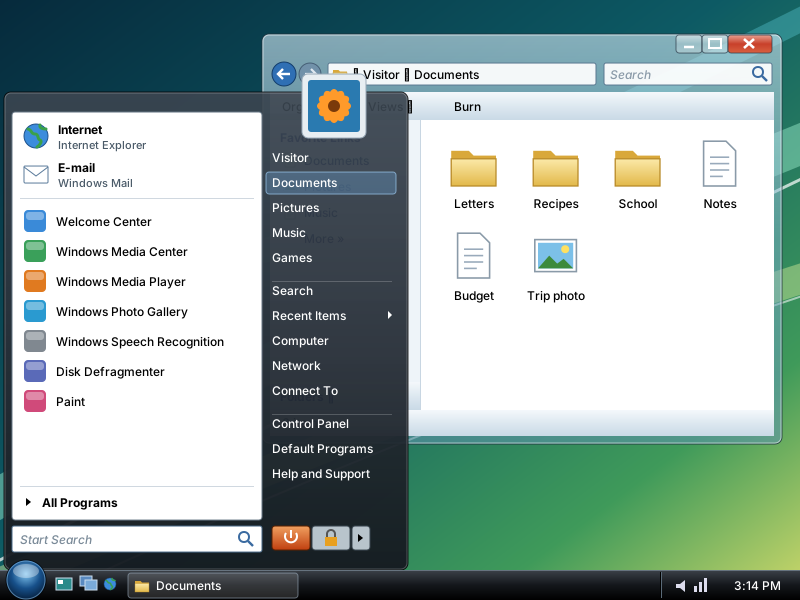
Design played a big role in Windows Vista. The taskbar and the borders around windows got a brand-new look, and a redesigned Start button appeared for the first time.2 With Aero, windows had see-through glass borders, and pointing at a taskbar button showed a small preview of the window, even of a running video. Aero was not included in Windows Vista Home Basic.1
Illustration · not a screenshot Our drawing of Windows Vista with the Aero look: see-through glass window edges1 and the redesigned Start button.2 Windows 7 kept the glass look.6See the real screen
Smart on security
Microsoft said Windows Vista had the strongest security system yet. User Account Control helped prevent harmful software from making changes to the computer. In Windows Vista Ultimate, BitLocker Drive Encryption gave the data on the computer better protection.2 With Parental Controls, parents could decide which kinds of TV, music and games were right for their children.3
Illustration · not a screenshot Close-up of our drawing of Windows Vista: the Start Search box at the bottom of the Start menu, for finding programs and files by typing.8See the real screen
Key moments
2006 On 30 November, Windows Vista becomes available to businesses with volume licences.4
2007 On 30 January, it reaches everyone else, in more than 70 countries.3
))